.svg)

.svg)




.png)
.webp)
Python workflow automation is a practical choice when you need to stitch together repeatable tasks, schedule jobs, handle dependencies, and keep the whole thing from turning into a mess. Python fits well because the library ecosystem is huge and the language stays out of your way. That said, it is not always the right tool once the workflow gets bigger, messier, or tied into a lot of moving parts. This is where things usually break. We’ll look at what Python workflow automation actually means, where workflow frameworks and systems fit in, how workflow management works, and why some teams end up moving to something like Nected instead.
What Is Python Workflow Automation
Its basically a workflow automation that is created using Python scripts, libraries, or engines to run tasks in a specific order without doing everything by hand. It can be as simple as a scheduled script or as involved as a multi-step business process with approvals, triggers, retries, and branching logic.
People usually reach for it when they need task orchestration, scheduling, dependency handling, or a way to connect different services. A data job runs after another one finishes. An API call kicks off a follow-up process. A report gets generated every morning. That kind of thing.
Python Workflow Frameworks
Python workflow frameworks are built to make automation less fragile. Instead of hardcoding every step in a script, you get a structure for task orchestration, scheduling, and dependency management. That part often gets ignored until the workflow starts failing in production.
Common framework features usually include:
- task orchestration
- scheduled execution
- dependency handling between steps
- retry and failure handling
- visibility into what ran and what didn’t
A good framework keeps the workflow readable. A bad one just hides a pile of scripts behind a nicer name.
Python Workflow Automation Systems
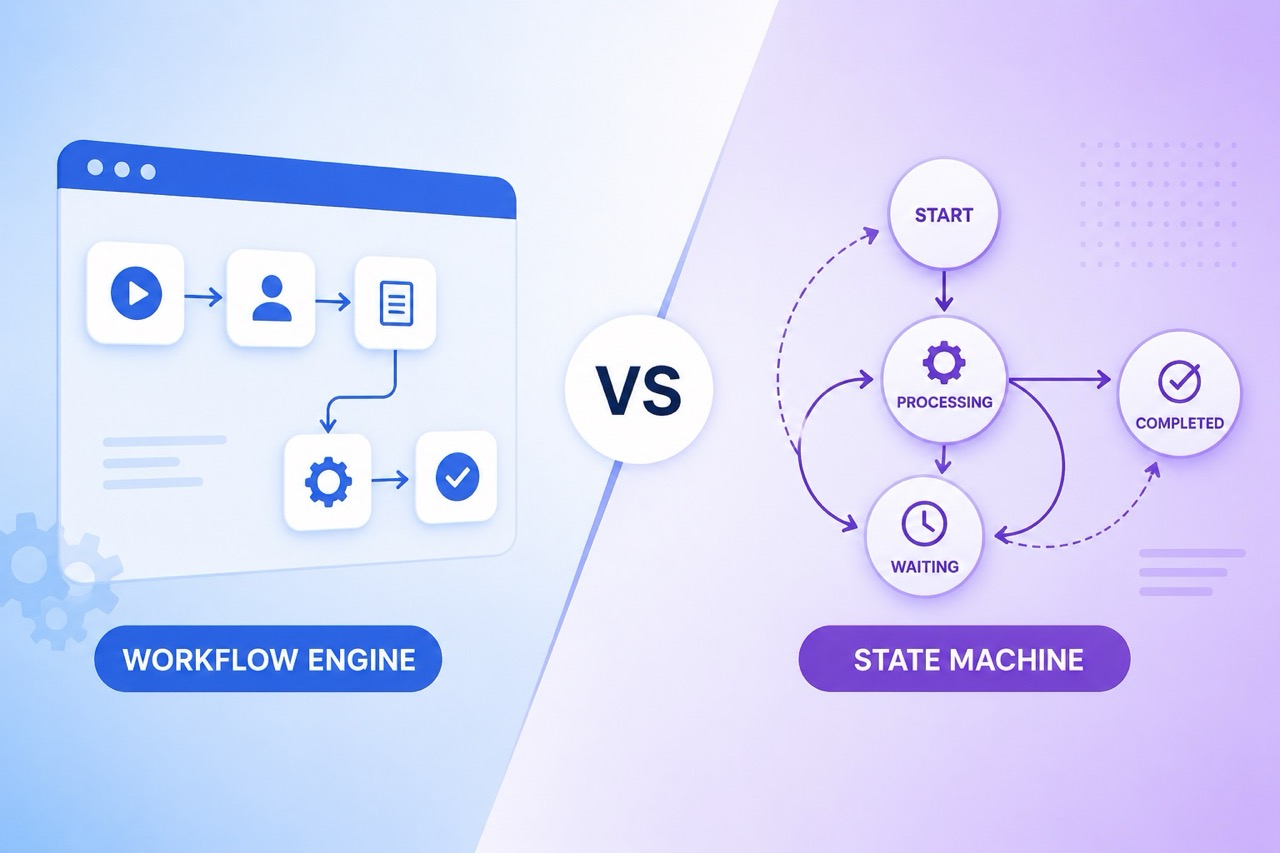
When people talk about a Python workflow automation system, they usually mean the larger setup around the scripts themselves. Not just the code, but the scheduler, the workflow engine, the orchestration platform, and the execution environment that actually runs everything.
At the system level, Python is often part of a bigger chain. One service triggers another. Jobs queue up. Workers pick them up. The engine decides what happens next. If the setup is clean, it works well. If it isn’t, you end up babysitting jobs and checking logs all day.
Workflow engines and orchestration platforms matter here because they handle the messy middle. They keep track of dependencies, retries, state, and execution order. Without that, Python automation can get brittle pretty fast.
Also Read: 7 Best Python Rule Engines
Python Workflow Management
Python workflow management is basically the day-to-day control layer. You’re not just running tasks. You’re watching them, coordinating them, and tracking where each execution stands.
That includes:
- workflow monitoring
- task coordination across services or teams
- execution tracking
- error handling and retries
- knowing which step failed, and why
This matters more than people expect. A workflow that runs once in testing is easy. A workflow that runs 500 times a day, across different systems, is a different story.
Python Workflow Automation Architecture
A typical Python workflow automation architecture has a few moving parts. First is the task scheduler. That’s what decides when something should run. Then comes the workflow engine, which handles the logic and the order of execution. After that is the execution layer, where the actual tasks get carried out.
The separation helps. The scheduler shouldn’t be doing business logic. The engine shouldn’t be buried in execution details. And the execution layer should stay focused on doing the work, not deciding what to do next.
Once those layers start bleeding into each other, maintenance gets ugly fast.
Use Cases of Python Workflow Automation
Python workflow automation shows up in a lot of the usual places. Nothing fancy, just work that needs to happen reliably and on time.
- data pipelines
- ETL processes
- task scheduling
- business workflows
- API orchestration
For example, a data pipeline might pull records from one system, clean them, and push them into a warehouse. An ETL process might do the same thing with more checks in the middle. API orchestration shows up when one request has to trigger several downstream actions in the right order.
Python Workflow Framework is Not for Everyone:
Python is flexible, and that is a big reason people use it for automation. But flexibility comes with tradeoffs. If the workflow is simple, Python feels easy. If it grows into a larger system, the maintenance side starts to matter.
Before picking Python for workflow automation, it helps to look at a few things:
- Project specifics: the size of the workflow, how many systems it touches, and how often it runs.
- Team expertise: whether the people building it can keep it stable over time.
- Community support: how active the framework or library ecosystem is.
- Security and compliance: whether the workflow needs stricter controls.
- System compatibility and integration: how much custom work is needed to connect everything.
- Cost considerations: build time, upkeep, and the little fixes that never stay little.
That is usually where the decision gets made. Not on the first demo. Later, when the workflow has real users and real pressure.
Also Read: Building Workflows with .Net
How to automate workflow with Python?
To show how Python workflow automation can look in practice, take a retail chain trying to personalize the customer experience across several touchpoints. The workflow needs to track behavior, trigger campaigns, generate recommendations, handle omnichannel interactions, and deal with support requests. Pretty standard on paper. In real life, it gets messy quickly.
Understanding the Workflow
The goal is to create a workflow that:
- Tracks Customer Behavior: Collect data from online, in-store, and mobile app sources.
- Trigger Marketing Campaigns: Start campaigns based on customer actions and preferences.
- Automates Recommendations: Provide personalized product or service recommendations.
- Facilitates Omnichannel Interactions: Keep the experience consistent across channels.
- Manages Inquiries and Complaints: Use chatbots or virtual assistants for basic support.
Step-by-Step Implementation
1. Setting Up the Environment
Install Python, create a virtual environment, and add the libraries you need. In this case, requests, pandas, and flask are enough to get started.
python -m venv venv
source venv/bin/activate # On Windows use `venv\\Scripts\\activate`
pip install requests pandas flask
2. Tracking Customer Behavior
For demonstration, the example below simulates data collection from an API endpoint:
import requests

def track_customer_behavior(customer_id):
# Simulated API call to fetch customer behavior data
response = requests.get(f"")
data = response.json()
return data
3. Triggering Marketing Campaigns
This function checks customer preferences and triggers a campaign:
def trigger_campaign(customer_data):
if customer_data['preference'] == 'new arrivals':
# Logic to trigger campaign
print(f"Triggering new arrivals campaign for {customer_data['name']}")
# This could involve API calls to a marketing automation system
4. Automating Recommendations
Generate personalized recommendations based on customer data:
def generate_recommendations(customer_data):
# Example logic for generating recommendations
recommendations = ['Product A', 'Service B']
print(f"Recommendations for {customer_data['name']}: {', '.join(recommendations)}")
return recommendations
5. Facilitating Omnichannel Interactions
A simple example to show how online and in-store activity can connect:
def manage_omnichannel_interaction(order_id):
# Fetch order details and check for in-store pickup
order_details = {"pickup": "in-store", "status": "ready"}
if order_details['pickup'] == "in-store" and order_details['status'] == "ready":
print(f"Order {order_id} is ready for in-store pickup.")
6. Managing Inquiries and Complaints
Simulate a chatbot interaction:
def handle_customer_inquiry(customer_question):
# Simple response logic for demonstration
responses = {
"return policy": "Our return policy is 30 days with a receipt.",
"store hours": "Our store hours are 9 am to 9 pm, Monday to Friday."
}
return responses.get(customer_question.lower(), "Let me connect you with a human agent.")
7. Bringing It All Together
Put the functions into a Flask application and expose a simple API for the workflow:
from flask import Flask, request, jsonify

app = Flask(__name__)

@app.route('/customer-interaction', methods=['POST'])
def customer_interaction():
data = request.json
customer_id = data.get('customer_id')
customer_data = track_customer_behavior(customer_id)
trigger_campaign(customer_data)
recommendations = generate_recommendations(customer_data)
return jsonify({"success": True, "recommendations": recommendations})

if __name__ == '__main__':
app.run(debug=True)
This example shows how a Python-based workflow can tie together customer journey orchestration in retail. Each function handles one step, which is fine until the workflow grows and starts needing more control around retries, dependencies, and monitoring.
Limitations of Python in Complex Workflow Automation
Python is great for a lot of workflow work. But once the setup gets more complex, especially inside older or tightly coupled systems, the cracks show.
- Scalability Concerns
- Scalability becomes a problem once automation spreads across more services and more executions. Python scripts are easy to start with, but they are not always fun to manage at scale.
- Integration Hurdles
- Connecting Python automation to legacy systems usually means custom glue code. That adds time, and it adds risk too.
- Maintenance and Technical Debt
- Python scripts age. Dependencies shift, business rules change, and the script that worked last quarter now needs another patch. This part often gets ignored.
- Performance Limitations
- For CPU-heavy jobs or real-time workflows, Python can become a bottleneck. Sometimes it is fine. Sometimes it is not even close.
- Security and Compliance Risks
- External libraries and custom integrations make security and compliance harder to keep tidy, especially in regulated environments.
From a developer’s point of view, building advanced workflow automation in Python takes more than just writing code. You need a clear handle on the infrastructure around it too. Without that, the workflow ends up depending on manual checks and fragile assumptions.
Getting to something robust usually means extra testing, more custom handling, and a lot of time spent on edge cases. So yes, Python can do it. But the cost climbs once the workflow needs consistency at scale.
Why you should choose Nected as an alternative to Python?
Nected is a stronger fit in a lot of workflow cases because it handles the decisioning and orchestration side without asking teams to build everything from scratch.
- Dynamic Rule Engine: Nected's Experimentation Engine allows for dynamic rule creation, enabling precise control over workflow automation. This feature is not available in Python, which relies on static coding.
- Streamlined Workflow Automation: Nected offers a no-code editor that simplifies the process of defining conditions and selecting preferred outputs, making it easier to implement workflows compared to Python's code-based approach.
- Data-Driven Rule Creation: Nected's Experimentation Engine allows for data-driven rule creation, which is not directly supported in Python. This feature enables more accurate and personalized workflows based on customer behavior and preferences.
- Quick Implementation: Nected can be implemented in just 15 minutes, while Python requires more time for setup and configuration.
- No-Code/Low-Code: Nected's no-code/low-code nature makes it easier for non-technical teams to implement and manage workflows, while Python requires a higher level of technical expertise.
- Customizable Actions: Nected allows for the configuration of actions and their reuse, which is not directly supported in Python. This feature enables more efficient workflow management and reuse of actions across different scenarios.
- On-Premise Setup: Nected offers on-premise setup for enhanced security, which is not directly supported in Python. This feature is particularly important for businesses dealing with sensitive customer data.
- Scalability: Nected is designed to perform efficiently even as usage expands, ensuring scalability for businesses with growing workload demands.
Nected gives teams a faster way to build and manage workflows without spending as much time maintaining code. Python still has its place, especially when a team wants full control. But if the goal is speed, reuse, and cleaner workflow management, Nected usually gets there faster.
Automating Customer Journey Orchestration with Nected
To personalize the customer experience across all touchpoints for a large retail chain, leveraging Nected for workflow automation offers a streamlined, efficient approach. Here's how to implement a complex workflow for customer journey orchestration using Nected:
1. Log into Nected Dashboard
Begin by accessing your Nected account. The dashboard is your central hub for workflow creation and management.
2. Navigate to Workflow Option
Find the ‘Workflow’ option in the dashboard's left panel. Clicking this takes you to the section dedicated to managing your workflows.
3. Create a New Workflow
Select the ‘Create Workflow’ button to start defining a new workflow. Here, you name your workflow, for example, "Customer Journey Orchestration," and choose its stage—staging for testing or production for live deployment.
4. Set Up an API Trigger
- Initiate your workflow with an API trigger. This is the event that activates your workflow. After clicking ‘Add’ or the plus icon, select ‘API Trigger’.
- Specify input parameters for the trigger, such as customer ID or behavior data, defining their types (e.g., string, number).
5. Add Actions and Rules
- Following the trigger setup, add the actions or rules your workflow will execute. These can range from executing scripts, database operations, to calling other predefined rules within Nected.
- Actions could include sending data to a marketing campaign manager based on customer preferences or updating customer profiles with behavior data.
6. Test Each Node
- Crucial to the setup is the testing of each node or action within your workflow. This step ensures that each component functions as expected and interacts correctly with others.
- Through testing, identify and correct any issues, ensuring a smooth operation of the workflow once live.
7. Publish Your Workflow
- With testing complete and all components verified, you can publish your workflow. Remember, all elements, including rules, must be in a published state for the workflow to be activated.
- The ‘Publish’ button finalizes the process, with the system highlighting any unresolved issues for correction before going live.
Implementing Customer Journey Orchestration
For a retail chain, this Nected workflow might encompass the following actions:
- Track Customer Behavior: The API trigger starts the workflow upon detecting customer activities across online, in-store, or app-based interactions.
- Trigger Marketing Campaigns: Based on the behavior data and preferences identified, the workflow triggers personalized marketing campaigns, ensuring that each customer receives relevant, targeted communications.
- Automate Recommendations: Incorporating customer preferences and past behavior, the workflow automates the generation and delivery of personalized product or service recommendations.
- Facilitate Omnichannel Interactions: The workflow manages seamless transitions between online and in-store experiences, such as coordinating online purchases with in-store pickups.
- Proactive Customer Service: By integrating with chatbots or virtual assistants, the workflow preemptively addresses inquiries and complaints, enhancing customer satisfaction.
This structured approach with Nected not only simplifies the automation of complex workflows but also ensures that the retail chain can deliver a personalized and unified customer journey, adapting dynamically to each customer's needs and behaviors.
Conclusion
The choice between Python-based workflow automation and Nected comes down to the shape of the job. Python works well when you want control and your team is comfortable building and maintaining the system around it. That flexibility is real, but so is the overhead.
Nected makes more sense when the goal is fast setup, easier workflow management, and less manual upkeep. It gives teams a cleaner path for automation without dragging them into a lot of custom glue code.
The best fit depends on the complexity of the workflow, the team’s technical depth, and how much maintenance you want to own later.
FAQs:
What is Python workflow automation?
Python workflow automation is the use of Python to run tasks, coordinate steps, and manage repeatable processes without manual intervention.
What are Python workflow frameworks?
Python workflow frameworks are tools that help structure task orchestration, scheduling, and dependency handling inside automation projects.
How does a Python workflow automation system work?
A Python workflow automation system usually combines a scheduler, a workflow engine, and an execution layer to run and track tasks in order.
What are the benefits of Python workflow automation?
The main benefits are flexibility, a strong library ecosystem, and the ability to automate repetitive work with relatively little setup.
How can developers automate workflows with Python using Nected?
Nected provides a low-code, no-code rule engine that empowers Python applications with dynamic business rules and decision automation, offering a secure, scalable, and customizable foundation for workflow automation.
What role does Nected play in enhancing Python workflow automation?
Nected accelerates rule and logic creation with minimal coding effort, promotes rapid development with ease of use, and offers limitless customizability and flexibility for creating complex workflows tailored to dynamic business requirements.
How does Nected support A/B testing in workflow automation?
Nected's Experimentation Engine facilitates A/B testing, empowering data-driven decisions and process optimization with exceptional speed, ensuring that developers can refine and optimize workflows effectively.
Can Python workflow automation with Nected be integrated into existing applications seamlessly?
Yes, Nected can be seamlessly integrated into existing applications, enhancing their capabilities and functionality, and providing developers with the tools to automate critical business processes efficiently.
What are the best practices for developers looking to implement Python workflow automation with Nected?
Developers should focus on developing a comprehensive automation strategy aligned with organizational goals, involve key stakeholders in the automation process, prioritize continuous improvement, and leverage Nected's features for efficient workflow orchestration and automation.



.svg.webp)

.webp)

.webp)
.webp)


.webp)