.svg)

.svg)



.png)
.webp)
The modern application does more than just handle the request-response cycle; it also handles the approval workflow, initiates the notifications, manages transactions, tracks the lifecycle of an order, handles retries, and performs entire business processes automatically. As systems grow more event-driven and distributed, businesses often encounter two architectural approaches repeatedly: workflow engines and state machines.
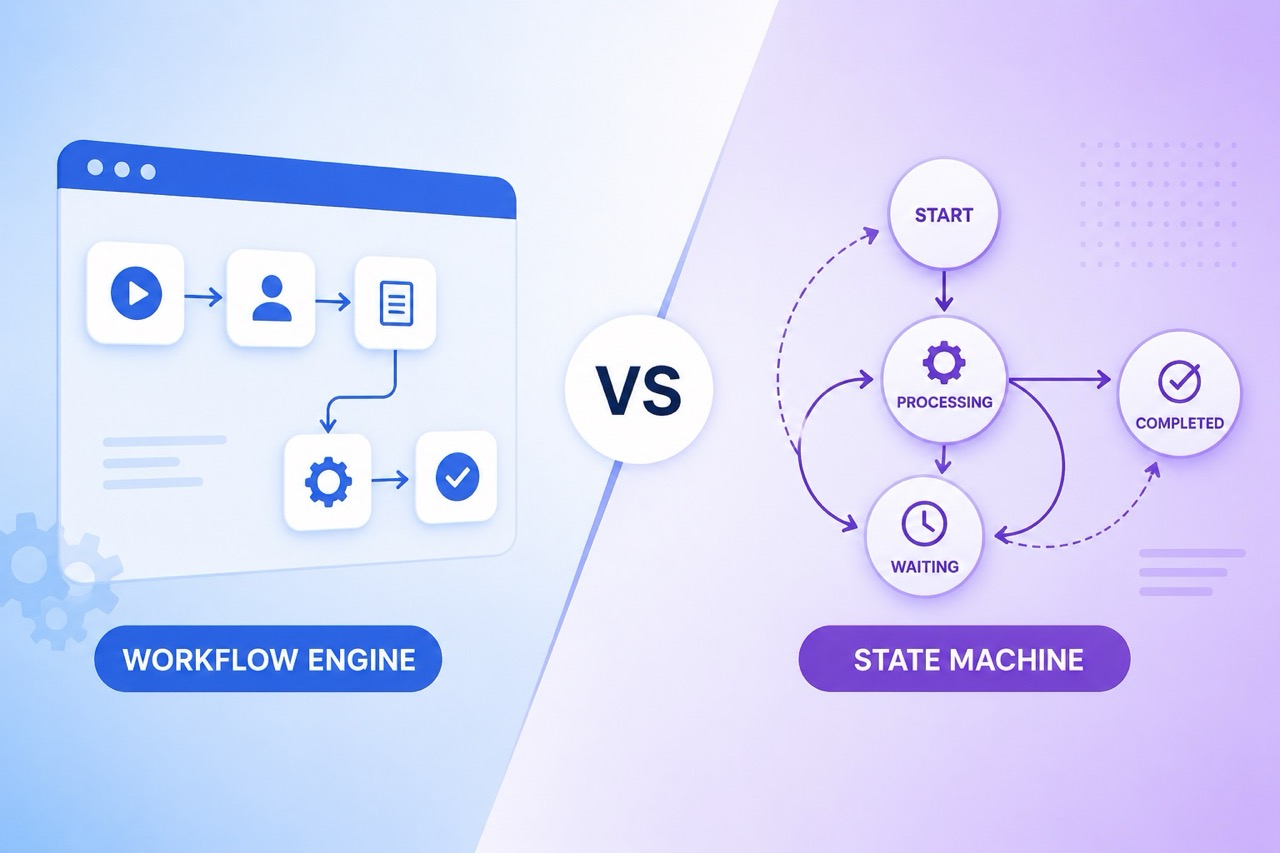
At first glance, they look similar because both manage process execution. But they solve different categories of problems. Understanding the workflow engine vs state machine discussion becomes important once automation starts spanning multiple services, user actions, and operational events.
Some businesses need structured workflow orchestration. Others need precise state transition management. And increasingly, many modern systems use both together instead of treating them as competing approaches.
What is a Workflow Engine?
Workflow engine refers to the automation of multiple process steps within a business. This entails automating how activities are coordinated across teams, application programming interfaces (APIs), databases, and other systems instead of manually orchestrating the activity.
For instance, an employee onboarding process would be;
- Create an employee profile for HR
- Create system access for IT
- Create a payroll account by Finance
- Approve the equipment requisition by the manager
- Send a welcome e-mail
The above actions can be orchestrated using a workflow engine. This is the simplest way to understand what is workflow engine architecture in practice. Workflow engines are commonly used for:
- Approval systems
- KYC onboarding
- Insurance claims processing
- Order fulfillment
- Customer support workflows
- Payment routing
- Employee onboarding
Unlike isolated automation scripts, workflow engines track execution progress across the entire process lifecycle.
Modern platforms like Nected extend workflow orchestration further by combining APIs, rules, workflows, integrations, and automation logic inside centralized operational systems instead of treating them separately.
Most workflow engines also support:
- Conditional branching
- Retry logic
- Scheduling
- Human approvals
- Parallel execution
- Event-driven triggers
That flexibility is why workflow orchestration has become a core part of modern operational systems.
What is a State Machine?
State Machine is an approach that describes the application logic through defined states and transitions.
At any particular point in time, an object or process is in one state only. An event causes the transition of one state to another state.
For example, the states of an order management system can be:
Pending → Paid → Shipped → Delivered
An event will cause the change of state:
- Event: Payment received → Change to Paid state
- Event: Shipment processed → Change to Shipped state
- Event: Delivery done → Change to Delivered state
A state machine is all about managing valid transitions between states. Hence, state machines become very useful for applications such as:
- Order flow management
- Payment processing
- Device state
- IoT systems
- Gaming systems
- Sessions
- Subscriptions
Unlike workflow engines, state machines do not pay too much attention to orchestration.
This distinction matters because many teams mistakenly use state machines to orchestrate large business workflows, which usually creates operational complexity later.
A state machine for business processes works best when the primary concern is managing entity states cleanly and predictably.
Workflow Engine vs State Machine: Core Differences
The confusion around the difference between workflow engine and state machine systems usually happens because both coordinate process execution in some form. But architecturally, they solve different problems.
- Workflow Focus vs State Focus
The workflow engine is responsible for managing the execution of a process across various tasks and applications. A state machine manages valid transitions between predefined states.
A workflow engine asks:
“What should happen next?”
A state machine asks:
“What state is this object currently in?”
- Orchestration Capability:
- Workflow engines are designed for orchestration. These include:
- APIs
- Services
- Databases
- Tasks performed by humans
- Approval tasks
- Triggered events
- State machines are generally used for managing the entity life cycle and not for orchestration.
- Workflow engines are designed for orchestration. These include:
- Dealing with Complexity:
- Workflow engines deal with:
- Processes that take a long time to complete
- Interactions among different systems
- Retries
- Conditional branches
- Scheduling
- State machines work well when transitions are predictable and controlled.
- Workflow engines deal with:
- Process Visibility:
Workflow engines are known to offer visibility throughout the whole process. State machines primarily provide visibility into current states and transitions.
- Scalability Style:
Workflow systems scale around process orchestration. State machines scale around entity behavior management.
Comparison Table
That's the reason why the debate between state machines and workflow engines is not about determining which one is superior but rather about selecting the proper design for the task.
Comparing Workflow Engines and State Machines: Benefits and Trade-Offs
Workflow Engine Benefits
- Centralized orchestration
- Easier process automation
- Built-in retries and scheduling
- Better operational visibility
- Human approval support
- Faster business process changes
Workflow Engine Trade-Offs
Workflow systems can become overly complex if used for simple state tracking. They need:
- Process Modeling
- Dependency Management
- Monitoring Infrastructure
State Machine Benefits
- Behavioral Modeling Clarity
- Controlled Transitions
- Predictable Execution
- Simplified Entity Lifecycle Monitoring
- State Machine Debugging Easier
State Machine Trade-Offs
State machines become hard to deal with when:
- Flows are lengthy
- There is human intervention required
- Multiple services must be orchestrated
- Retry mechanisms exist
- Business processes change often
From there, orchestration is layered on top anyway.
Real-World Applications of Workflow Engines and State Machines
Industry
Workflow Engine
State Machine
Banking & Fintech
Manages complete operational flows like loan approvals, KYC verification, compliance checks, and risk assessment pipelines
Tracks payment lifecycle states such as initiated, pending, failed, reversed, or completed
E-commerce
Coordinates inventory checks, payment processing, shipping, refunds, and customer notifications across multiple services
Controls order status transitions like placed, packed, shipped, delivered, or returned
Healthcare
Automates patient onboarding, insurance approvals, lab coordination, and treatment workflows
Maintains patient status progression, such as admitted, under treatment, discharged, or transferred
Logistics & Delivery
Orchestrates warehouse operations, driver assignment, routing, delivery scheduling, and notifications
Tracks parcel movement states like picked up, in transit, out for delivery, or delivered
SaaS Platforms
Handles onboarding workflows, subscription billing flows, email automation, and support escalation processes
Manages account lifecycle states such as trial, active, suspended, expired, or cancelled
Manufacturing
Coordinates procurement, production approvals, quality checks, and supply chain operations
Tracks product lifecycle stages like produced, inspected, packaged, shipped, or recalled
Can Workflow Engines and State Machines Work Together?
Indeed, and most contemporary systems integrate both techniques. In other words, while the workflow engine is responsible for orchestrating processes through different services, approvals, API calls, retries, and notifications, the state machine ensures control over the states of the entity.
Take, for instance, a loan application system in which the workflow engine performs tasks such as verification, fraud detection, and approval workflows, whereas the state machine keeps track of different states of an application, e.g., "submitted," "being reviewed," "approved," "rejected."
Common Mistakes Teams Make While Choosing Between Them
- Using State Machines for Full Workflow Orchestration
This is probably the most common mistake. Teams try to manage approvals, retries, integrations, notifications, and orchestration entirely inside state transitions. The result becomes difficult to maintain quickly.
- Overengineering Workflow Systems
Not every system needs a full workflow engine. Simple lifecycle tracking may work perfectly fine with a lightweight state machine.
- Overlooking Operational Visibility
With increasing complexity, troubleshooting distributed processes without operational visibility and failure histories is nearly impossible.
- Blurring Business Logic Everywhere
Inconsistent use of rules, transitions, orchestration, and API logic results in a fragile architecture, and centralized orchestration becomes increasingly essential.
- Deciding by Following Trends
Orchestration is selected for a system just because it sounds trendy in the market. Such architectural decisions should be based on operational requirements, not trends.
Future Trends in Workflow Automation and State Management
With an increasing number of interconnected and larger systems, workflow automation is becoming smarter and more event-driven. Automation using artificial intelligence is now being applied to tasks such as approval decisions, routing, detection of exceptions, and process prioritization rather than fixed workflows alone.
The other trend is that of increased importance of state coordination because of the continuously reactive nature of the system to any changes. Organizations are increasingly considering hybrid systems that integrate workflows, APIs, rules, AI models, and orchestration into a single platform.
Nected reflects this shift. Another growing trend is low-code automation, where business teams can manage workflows without depending entirely on engineering teams.
How to Choose Between a Workflow Engine and a State Machine
The answer depends entirely on what problem needs solving.
A workflow engine is usually the better choice when:
- processes span multiple systems
- approvals exist
- retries matter
- orchestration complexity grows
- Workflows evolve frequently
A state machine makes more sense when:
- Lifecycle tracking matters
- State consistency is critical
- transitions must remain controlled
- Workflows are relatively simple
Many businesses eventually use both together. That combination often creates cleaner architecture because orchestration and lifecycle management remain separated instead of mixed into one layer.
Conclusion
Workflow engines and state machines both serve an important purpose within system architecture today, yet they address distinctly different operational issues.
Workflow engines operate in orchestrating processes with multiple steps, working between systems, approvals, APIs, and automation. State machines work best at dealing with state transition and predictable state-based behavior.
The problem is not selecting the “winner” between a workflow engine and a state machine, but rather knowing which architecture will work better in terms of operational requirements.
With automation systems becoming distributed and event-driven, the combination of the two approaches, along with Nected, becomes common practice.
FAQs
How are workflow engines and state machines different?
A workflow engine takes care of the orchestration part, whereas a state machine focuses on state transitions and lifecycle.
Can workflow engines be combined with state machines?
Yes. There are many modern examples where workflow engines and state machines coexist.
When are businesses advised to employ workflow engines?
Whenever there is a need for multi-staged business processes with approvals, APIs, retries, and distribution of tasks.
What tasks does a state machine fit better?
State Machine is suitable for managing lifecycles and transitions.
Are workflow engines and state machines exclusive of each other?
No, although one cannot fully substitute another in many cases.


.svg.webp)
.webp)
.webp)
.webp)



.webp)