.svg)

.svg)


.png)
.webp)
Every time you write a piece of software that does more than simply serve static HTML, you’re building a workflow. You take some data, pass it through a series of transformations or checks, and spit out a result.
But we rarely step back to classify how we're moving that data around until the system breaks down. You get a Jira ticket to "automate the data ingestion," you write a quick script, and six months later you're staring at an unmaintainable mess of nested if statements and race conditions. Usually, this happens because you applied the wrong workflow pattern to the problem.
Under the hood, almost all system processes boil down to four types of workflows. Understanding which one you actually need is half the architectural battle.
1. Sequential Workflows (The Linear Path)
This is the most basic model. Step A happens, then Step B, then Step C. The process only moves forward, and a step cannot begin until the previous one finishes successfully. Think of it as a strictly enforced Directed Acyclic Graph (DAG) with a single path.
Where you see it: CI/CD pipelines are the classic example. You don't want to deploy an image to production if the unit tests haven't passed. Standard cron jobs and simple ETL (Extract, Transform, Load) scripts also live here.
The catch: Sequential workflows are dead simple to build and reason about, which makes them tempting to use everywhere. But they are incredibly rigid. If Step B fails, the whole pipeline halts. They also handle human intervention terribly. If you try to jam a "wait for manager approval" step into a purely sequential script, you'll end up holding database connections or execution threads hostage for days.
                    WORKFLOW TYPES

        ┌────────────────────────────────────┐
        │          Sequential Workflow       │
        │   A → B → C → D                    │
        │   One step after another           │
        └────────────────────────────────────┘

        ┌────────────────────────────────────┐
        │         State Machine Workflow     │
        │ Pending ↔ Approved ↔ Rejected      │
        │ Event-driven state transitions     │
        └────────────────────────────────────┘

        ┌────────────────────────────────────┐
        │        Rules-Driven Workflow       │
        │ IF Amount > £500                   │
        │      ↓                             │
        │ Manual Review / Auto Approve       │
        └────────────────────────────────────┘

        ┌────────────────────────────────────┐
        │          Parallel Workflow         │
        │         A                          │
        │      ↙  ↓  ↘                       │
        │     B   C   D                      │
        │       ↓                            │
        │     Merge Results                  │
        └────────────────────────────────────┘
The four workflow types differ in how work progresses: sequential workflows execute one task at a time, state machines transition between predefined states, rules-driven workflows dynamically determine the next step based on business logic, and parallel workflows execute multiple tasks simultaneously before combining the results.
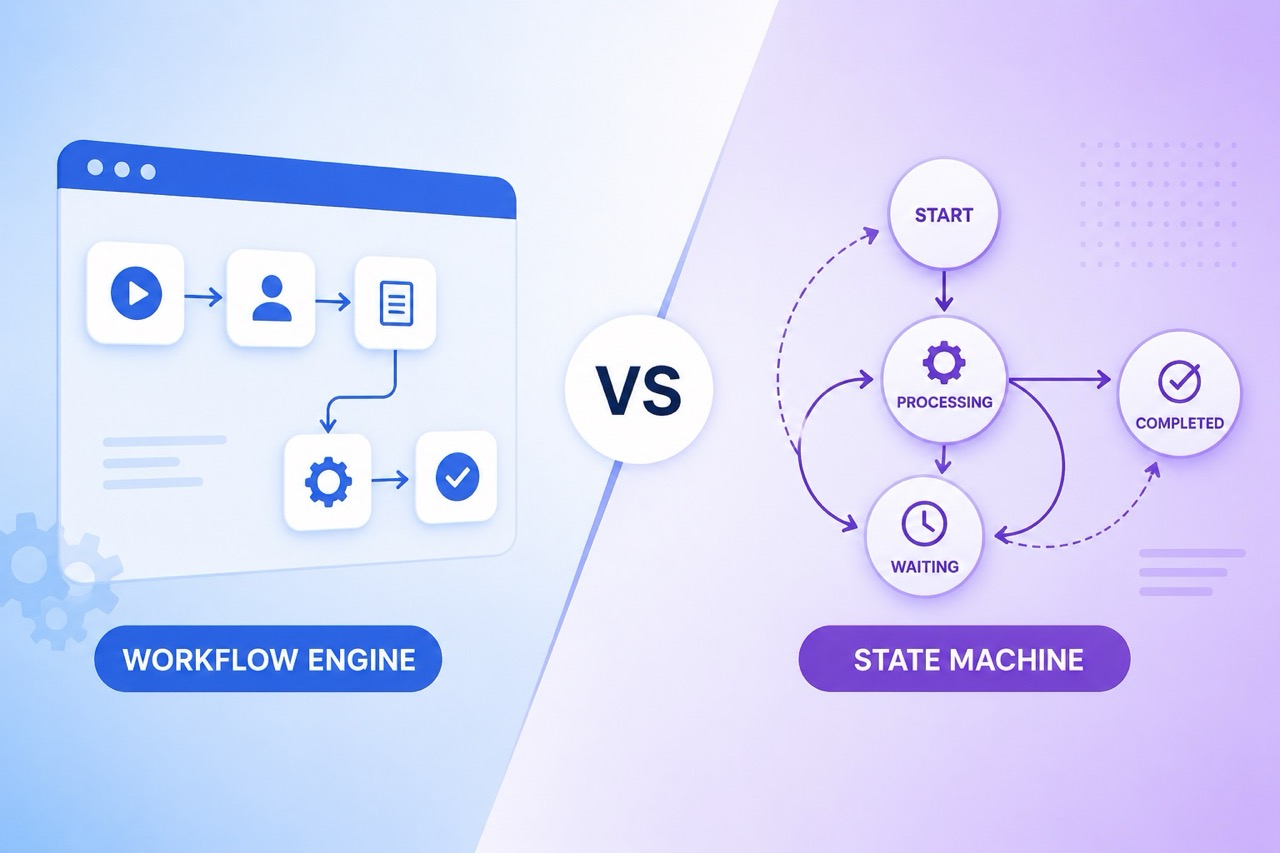
2. State Machine Workflows (The Event-Driven Model)
If sequential workflows are about the steps, state machine workflows are about the resting state of the data. The process isn't a straight line; it's a set of predefined states and the specific events that allow transitions between them. You can move forward, backward, or loop around, as long as the transition is valid.
Where you see it: E-commerce order processing is a textbook state machine. An order goes from Pending -> Paid -> Shipped. But it can also go from Paid back to Refunded. User onboarding flows and complex ticketing systems (like Jira itself) also rely heavily on finite state machines (FSMs).
The catch: State machines force you to explicitly define every possible valid transition, which prevents weird intermediary bugs (like shipping an item that was cancelled). However, building the underlying state management logic can be heavy. You need a reliable way to lock records during transitions so concurrent events don't corrupt the state.
Also Read: How to Build a Dynamic Workflow Engine
3. Rules-Driven Workflows (The Dynamic Router)
This is where things get messy. In a rules-driven workflow, the path of execution isn't hardcoded as a sequence or a rigid state transition. Instead, the workflow evaluates the payload against a complex set of conditional rules at runtime to figure out what to do next.
Where you see it: Fraud detection systems, dynamic loan approvals, or complex notification routing. For example: If the transaction is over $500 and from a new IP address, route to the manual review queue; otherwise, auto-approve.
The catch: Without a dedicated rules engine, these workflows quickly devolve into a giant, unreadable block of spaghetti code. Debugging is notoriously difficult because you can't just look at the system topology to know what happened—you have to replay the exact state of the variables at the time the rules were evaluated.
4. Parallel Workflows (Fan-out / Fan-in)
Sometimes doing things one by one is just too slow. Parallel workflows take a single trigger, split the workload into multiple concurrent tasks (fan-out), and usually wait for all of them to complete before aggregating the results and moving on (fan-in).
Where you see it: Batch data processing, image resizing pipelines, or aggregating data from multiple third-party APIs to serve a single user request. If you're using AWS Step Functions or writing MapReduce jobs, you're deep in parallel workflow territory.
The catch: Concurrency is hard. You have to handle partial failures gracefully. What happens if you fan out to 50 workers and worker #42 times out? Do you fail the whole batch, or retry just that one? You also have to ensure your tasks are idempotent—meaning if a worker restarts and runs the same task twice, it doesn't corrupt your database.
Also Read: Workflow Engine with PHP
What's the Difference Between the Workflow Types?
If you just need a quick cheat sheet on when to use which pattern, here's how they stack up against each other:
Also Read: Top Workflow Orchestration Tools in 2026
Wrapping Up
Honestly, most non-trivial applications end up using a mix of these. You might have a state machine handling the high-level lifecycle of a user account, while a parallel workflow handles their background data imports.
The trick isn't memorizing the definitions. It's recognizing the constraints of your problem before you write the first line of code. Don't build a massive state machine for a simple nightly database dump, and please, stop trying to write complex conditional routing using sequential shell scripts. Pick the right tool for the job.
FAQs
Q: What happens when a human needs to intervene in the process?
A: Don't pause a sequential script and hold a thread open waiting for an email reply. That's a great way to OOM your worker nodes or run out of database connections. Instead, use a state machine. Move the record to a Pending Approval state and kill the active process. When the human finally clicks "Approve", an event fires to pick it back up.
Q: Can I combine these workflow types?
A: Absolutely, and you probably should. Real-world systems are messy. You might have a state machine tracking a user's subscription lifecycle. But when they hit the Cancelled state, it triggers a parallel workflow to fan out webhooks to Salesforce, Stripe, and your internal analytics database at the same time.
Q: Do I actually need a dedicated workflow engine like Temporal or Airflow?
A: Not right out of the gate. If a cron job and a database column named status get the job done, ship it. You only need to bring in a dedicated engine when retries become a nightmare, you need deep observability into complex DAGs, or you're tired of writing boilerplate code to handle partial failures and state recovery.


.svg.webp)
.webp)
.webp)
.webp)


.webp)